
1. Purpose of ScreenOnPC PC Keyboard
ScreenOnPC PC Keyboard is a built-in feature that allows for direct text input to a phone using a PC keyboard. To use this feature, ScreenOnPC PC Keyboard must be (1) added as an Input Method on the phone, and then (2) selected as the active Input Method.
2. How to add ScreenOnPC PC Keyboard as an Input Method
Method 1: In the ScreenOnPC Server app menu, select Add Input Method and enable ScreenOnPC PC Keyboard. Method 2: Navigate to Settings -> General Management -> Keyboard, and enable ScreenOnPC PC Keyboard.
3. How to select ScreenOnPC PC Keyboad as the active input method
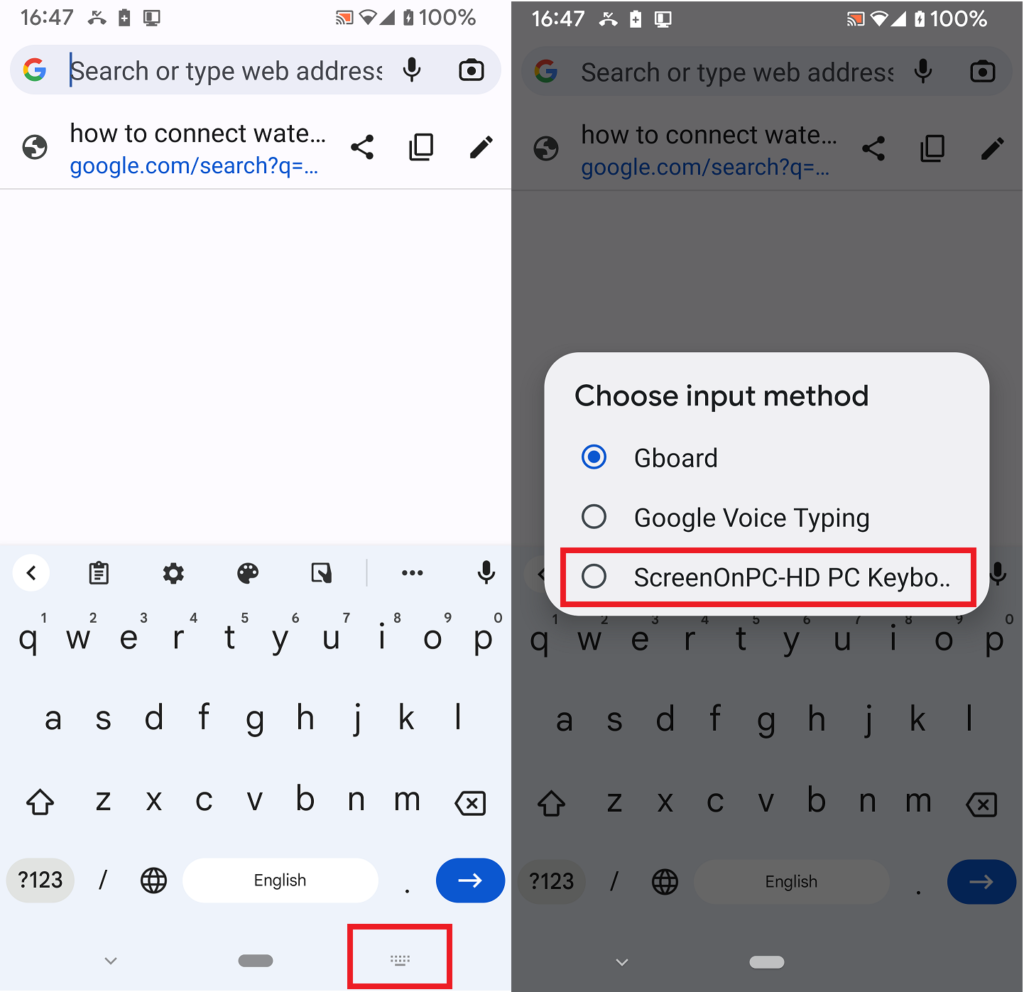
Method 1: On the viewer, click Phone -> Change Input Method, and select ScreenOnPC PC Keyboard. Method 2: Select Change Input Method from ScreenOnPC Server app menu. Method 3 (as shown in the picture below): While a text field is active, tap the keyboard icon in the bottom navigation bar to switch the active keyboard.
4. How to input text when using ScreenOnPC PC Keyboard
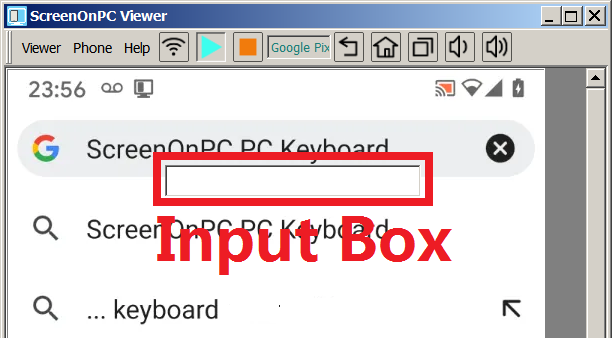
Once ScreenOnPC PC Keyboard is added and selected, tapping a text edit field will cause an input box to appear on the PC (as shown in the picture below). Characters typed into this input box on the PC are transferred to the phone and processed as standard keyboard input to the phone.
5. Does the input box allow pasting text?
Yes. Text can be pasted into the input box using the PC copy-and-paste function.
6. Difference between ScreenOnPC PC Keyboard and Text Forwarding
While both features can be used to send text to the phone, each also provides different functions. The main purpose of the ScreenOnPC PC Keyboard feature provides an external keyboard for the phone. On the other hand, the Text Forwarding provides a text copy-and-paste capability between the phone and the PC.
7. How does the ScreenOnPC PC Keyboard protect user information?
Keyboard input data is transmitted only from the ScreenOnPC Viewer on the PC to the ScreenOnPC Server on the phone. No Data Storage: Input data is not stored by either the viewer or the server. No Data Sharing: Data is not shared with any third-party programs. Encryption: If encryption is enabled, data is protected during network transmission.
Go back to ScreenOnPC FAQ